




- Published on: 2026-10-25 08:14:13
How to Verify a Broker's License and Check Its Status

A license number alone doesn’t tell the whole story. To learn how to verify a broker's license, search the relevant official regulator’s database by the person’s name, business name, or alias, then check the license category and current status. In Texas, the Texas Real Estate Commission provides a search for real estate license holders.
It’s easy to assume that everyone called a broker holds the same authorization. But license categories matter: brokers and salespeople may have different classifications, and search options vary by state and profession. This guide explains how to find the right public record, search alternate names, distinguish broker from salesperson categories, and interpret the details in a license record. Use these steps to make a more informed decision before moving forward.
Key Takeaways
- Search using a person’s proper name, business name, or alias, and try different formats if the first search returns no match.
- Confirm the record’s license category so you can distinguish a broker from a salesperson or another professional type.
- Review the public record’s status and details; an inactive license may affect whether the holder can perform regulated work.
- Choose the official lookup based on the profession and state, since search fields and records vary across the United States.
- Use license verification to assess a professional’s credentials, then explore trading account options separately to find a setup that fits your goals.
Searching by business name or alias
A business name is the name an entity uses in its public or commercial dealings. An alias is another name associated with a person or business, such as a trade name. Search each name separately in the official regulator’s database, since a license record may use a different name from the one shown in an advertisement.
Start with the state and profession tied to the activity. A real estate broker search may be separate from a mortgage broker search, even though both use the word “broker.” In Texas, the Texas Real Estate Commission provides a license holder search for Texas real estate license holders. Use the regulator responsible for the specific license you’re checking.
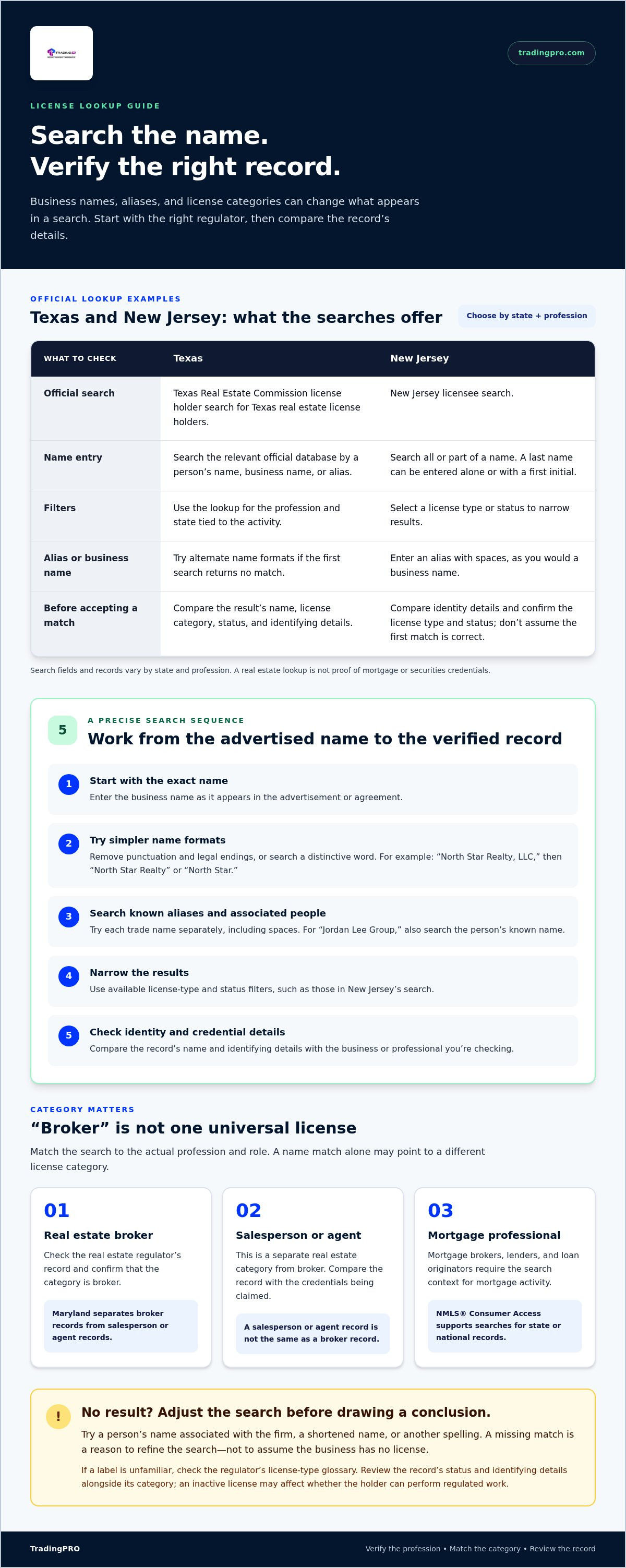
Search the business name first, then try it without punctuation or with shortened terms. For example, if a firm advertises as “North Star Realty, LLC,” try “North Star Realty” and “North Star.” Focus on distinctive words rather than adding every legal suffix. A comma, period, or “LLC” may affect results, depending on how the database stores names.
New Jersey’s licensee search accepts all or part of a name and allows users to select a license type or status. If the full business name returns no result, start with a distinctive part of the name, then narrow the results using the available filters. This can help separate similarly named firms without assuming the first match is correct.
To search an alias in New Jersey’s database, enter it with spaces, as you would a business name. If someone operates under “Jordan Lee Group,” try that phrase as well as the person’s known name. Treat each result as a possible match until its identity details align with the business or professional you’re checking.
Use this sequence to make the search more precise:
- Enter the business name exactly as it appears in the advertisement or agreement.
- Remove punctuation and legal endings, then search a distinctive word or phrase.
- Repeat the search with each known alias or trade name, including spaces.
- Apply available license type and status filters, such as those in New Jersey’s search.
- Compare the result’s name and other identifying details with the business information you have.
A missing match is a reason to adjust your search, not to assume the business has no license. Try a person’s name associated with the firm, a shortened name, or another spelling. If several records appear, compare the license category and identifying details before deciding which relates to the business. For Texas real estate records, use the Texas Real Estate Commission’s license holder search; for other professions, use the relevant state regulator.
New Jersey’s licensee search accepts a last name alone or with a first initial. To check an individual’s or business’s registration status, identify the license type and select its link. The page directs users to search engines for investment professionals’ background facts. Applicants must provide an email address for Department communications about account or licensing issues. Failure to respond to an email notice may prevent them from doing business or lead to disciplinary action.
Broker and salesperson license categories
If a broker doesn’t appear in an official database, check the state, profession, spelling, and selected license category before drawing conclusions. For North Carolina broker license status, contact the North Carolina Real Estate Commission’s Education and Licensing Division at 919.875.3700 or [email protected].
A broker license is a credential category used for professionals identified as brokers in a regulator’s records. Its exact meaning depends on the profession and jurisdiction, so a real estate broker record doesn’t prove mortgage or securities credentials. Match the database to the activity you’re checking, then consult its license-type glossary to understand the category.
A salesperson license is a separate real estate category from a broker license. A record may classify someone as a salesperson or agent rather than a broker, so the distinction matters. For example, Maryland’s RELD separates broker records from salesperson or agent records. Search the category that matches the person’s listed credentials, not just the job title used in an advertisement.
Use the record’s category to interpret the result, but don’t stop there. A name match alone may point to someone with a different license type. Compare the person or firm, jurisdiction, and status shown. If the database provides a glossary, use it to clarify unfamiliar labels before deciding what the category means.
To avoid mixing categories, follow these checks:
- Identify the profession, such as real estate or mortgage lending.
- Select the matching regulator’s database and license type.
- Compare the result’s category with the role being advertised.
- Read the regulator’s glossary when a label is unfamiliar.
- Review the record’s status and identifying details alongside its category.
For example, a Maryland record classified as salesperson or agent isn’t the same as a broker record. Similarly, a mortgage professional’s NMLS® Consumer Access result belongs to a different search context from a real estate license entry. These distinctions help you identify the right record and avoid mistaking a similar name for the credential you meant to verify.
Looking up a license
A license lookup searches a regulator’s record for an individual or business. To learn how to verify a broker's license, identify the profession and license category, then use the corresponding official search.
License Search Details
Search details are the identifiers a licensing database accepts to locate a record. Depending on the system, these may include a name, firm, license number, city, or county.
The North Carolina Real Estate Commission’s broker search accepts a license number, name, city, or county. Start with the most specific identifier available, then try another accepted field if the first search returns no match. A city or county can help narrow results when names are shared.
A CRD number is an identifier used in certain searches for investment professionals or firms. Use it only in a database that accepts it, not in place of a real estate license number. If you have only a person’s name, search it and compare the result’s identity and license category.
New Jersey’s licensee search accepts a 7-digit reference number. For a person’s proper name, enter the last name first, followed by a comma and first name, without a space after the comma. You can also search by last name alone or by last name and first initial. Correct formatting can help surface the intended record.
If several records appear, compare each entry’s name, location, and license type. Keep your search identifiers aligned with the profession you’re checking. A matching name alone doesn’t establish that a result belongs to the broker or firm you mean.
U.S. License Verification
U.S. license verification means checking a professional’s record in the database for the relevant profession and jurisdiction. To verify a broker’s license and confirm it covers the services offered, compare the record’s current status and category with the broker’s role.
Choose the right system first. NMLS® Consumer Access can be used to search for a state or national mortgage broker, lender, or loan originator. The North Carolina Real Estate Commission’s online license database displays brokers with active and inactive statuses.
Read the category and status together. In North Carolina, an inactive broker license is identified by a note at the top of the broker’s record. Check that note before treating the record as evidence of current authorization for the relevant activity.
Ohio’s license lookup system was retired, and its data stopped being updated, effective October 16, 2025. Don’t rely on that retired system for current status. Select the appropriate current regulator’s lookup, then search using the identifiers accepted by that database.
For a practical check, note the database used, search term, category, and displayed status. Compare the result with the broker or firm details connected to the service. If you need help with North Carolina broker license status, contact the North Carolina Real Estate Commission’s Education and Licensing Division at 919.875.3700 or [email protected].
Public license information
Public license information is the record a regulator makes available about a licensed person or business. Compare the official record’s identity, license category, and status with the details you’re assessing.
Public License Records
A public license record is a regulator’s entry showing a professional’s licensing details. North Carolina’s Real Estate Commission database displays brokers with active and inactive statuses. An inactive broker license is identified by a note at the top of the record.
Maryland’s RELD lists 41,991 real estate license records, including 41,991 active licenses. Its records include 3,901 broker licenses and 38,090 salesperson or agent licenses. Use the category and status together; a matching name alone doesn’t establish which record applies.
To spot information that may be outdated or misleading, compare it with the regulator’s current record. Check the name, license category, and status directly in the database instead of relying only on a screenshot or copied text. If details differ, use the official record as your reference.
The OFR Regulatory Enforcement and Licensing system, or REAL, supports registration-status checks for several financial and business categories. These include broker-dealer firms and branches, investment adviser firms and branches, and state-chartered financial institutions. Select the category that matches the entity before interpreting the result.
Disciplinary History and Disclosures
Disciplinary history is information about regulatory actions recorded for a professional or firm. To check complaints, disciplinary history, and disclosures, search the relevant regulator’s public records and review any complaint or enforcement information included in the record.
A complaint and a licensing status answer different questions. People who believe there has been a violation of the Real Estate License Act or Texas Real Estate Commission rules can file a complaint. Treat a complaint as a report of an alleged issue, then review the regulator’s record for any related public action or disclosure.
For investment professionals, use search engines to find background information, then compare relevant details with the official record. Keep the professional’s name and firm consistent across searches. A similar name or unrelated result doesn’t establish a connection to the broker you’re checking.
Work through these checks:
- Match the public record to the person or firm.
- Read the license category and current status together.
- Review regulator-published complaint, enforcement, or disclosure details.
- Compare outside background information with the official record.
For example, a North Carolina record marked inactive shouldn’t be read as active just because another profile describes it that way. The status note and record details provide the clearer reference.
Update your personal information whenever necessary. Keep the details you provide consistent with the person or firm you’re identifying, and review them before relying on a result. If something needs correction, make the update promptly and use the revised information for further checks. This helps keep your records aligned with the details you’re assessing, without treating a name match as proof of identity.
How can I verify a broker's license in the United States?
A U.S. broker license check means searching the regulator’s records for the relevant profession and jurisdiction. Start by identifying whether the broker works in real estate, mortgage lending, securities, or another regulated field.
The United States doesn’t use one search for every broker category. Choose a database that matches the activity, then review the record’s identity, registration type, and status. A real estate license search won’t verify a mortgage registration, and a business name alone may not identify the right record.
Use these steps to choose and review the appropriate record:
- Identify the profession and the state connected to the broker’s activity.
- Select the regulator’s lookup or registration system for that profession.
- Search with the identifiers the database accepts, such as a name or license number.
- Compare the record’s name, firm, license category, and status with the broker’s details.
For a state or national mortgage broker, lender, or loan originator, use NMLS® Consumer Access. For a state, national, or federal credit union, the National Credit Union Administration search can identify the institution. For a state or national bank, or savings and loan, use the Federal Deposit Insurance Corporation search.
Investment-related searches require careful category selection. The OFR Regulatory Enforcement and Licensing system, known as REAL, verifies registration status for broker-dealer firms and branches, investment adviser firms and branches, and state-chartered financial institutions. Choose the matching entity type before interpreting the result. A firm’s registration and an individual’s license may appear as separate entries.
For Florida-related records covered by REAL, check that the firm name and branch details match the entity you’re researching. For mortgage searches through NMLS® Consumer Access, compare the result with the person’s or business’s advertised role. In either case, review the status in the relevant record rather than relying on a profile, email signature, or copied license image.
Searches for banks and credit unions identify institutions, not necessarily an individual employee’s professional credentials. If you’re checking a named person, distinguish the institution’s registration from the person’s separate license or registration. This prevents an institution’s record from being mistaken for an individual broker’s authorization.
Keep a simple record of your search: the database, search term, matching entity, category, and status shown. If a result appears under a different firm name, compare the business details before treating it as a match. Use the regulator’s category labels to guide your interpretation, since “broker” can refer to different regulated activities across U.S. databases.
TradingPRO: Rookie Account
TradingPRO’s Rookie Account is a next step for readers exploring trading after checking a broker’s license. License verification helps you assess regulatory records; choosing an account is a separate decision about how you want to trade. Consider the Rookie Account alongside TradingPRO’s Micro Account, Pro Account, and Scalp Account, and compare the options with your trading approach before proceeding.
Keep these decisions separate. A public license record doesn’t determine which account suits your goals, and choosing an account doesn’t replace checking relevant licensing information. Use the verification steps above to assess credentials, then review TradingPRO’s account options for your trading needs. Visit the TradingPRO website to explore the Rookie Account.
Make your next move with confidence
Knowing how to verify a broker's license gives you a stronger foundation for informed decisions. Apply the same discipline to what comes next: separate credential checks from your trading goals, then choose an account type that fits your approach.
TradingPRO offers the Rookie Account, Micro Account, and Pro Account. Consider which aligns with your experience and trading preferences, and review your options before moving forward. A considered next step keeps your focus on decisions you can evaluate rather than assumptions.
Contact TradingPRO for assistance as you explore your next step. Keep asking clear questions, compare choices thoughtfully, and move forward with confidence.


