

Blog
  • Published on: 2026-11-06 15:10:00

How to Change Your Phone Number
How to Change Your Phone Number

Keeping your personal information up to date, such as your phone number, is crucial for maintaining account security and ensuring smooth communication regarding your trading activities. For traders on the platform, changing your phone number is a quick and straightforward process that can be done directly from the client portal.

Here is a complete step-by-step guide on how to update your phone number:

1. Visit the Official Website and Log In
How to Change Your Phone Number

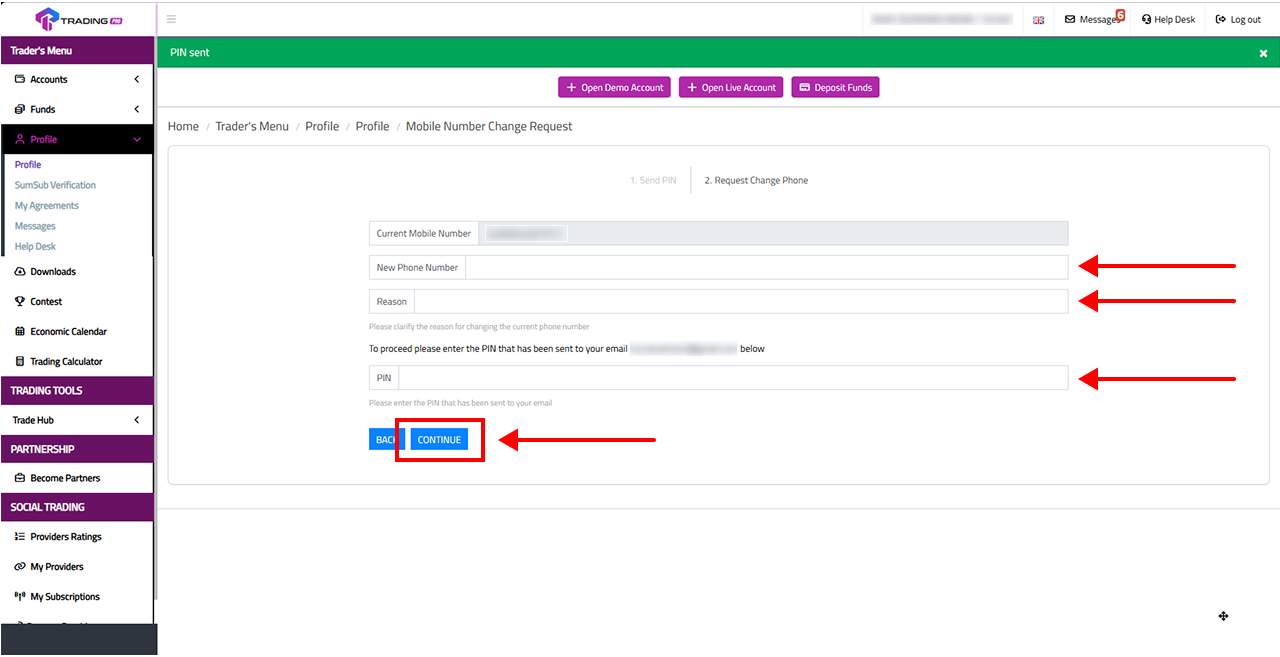
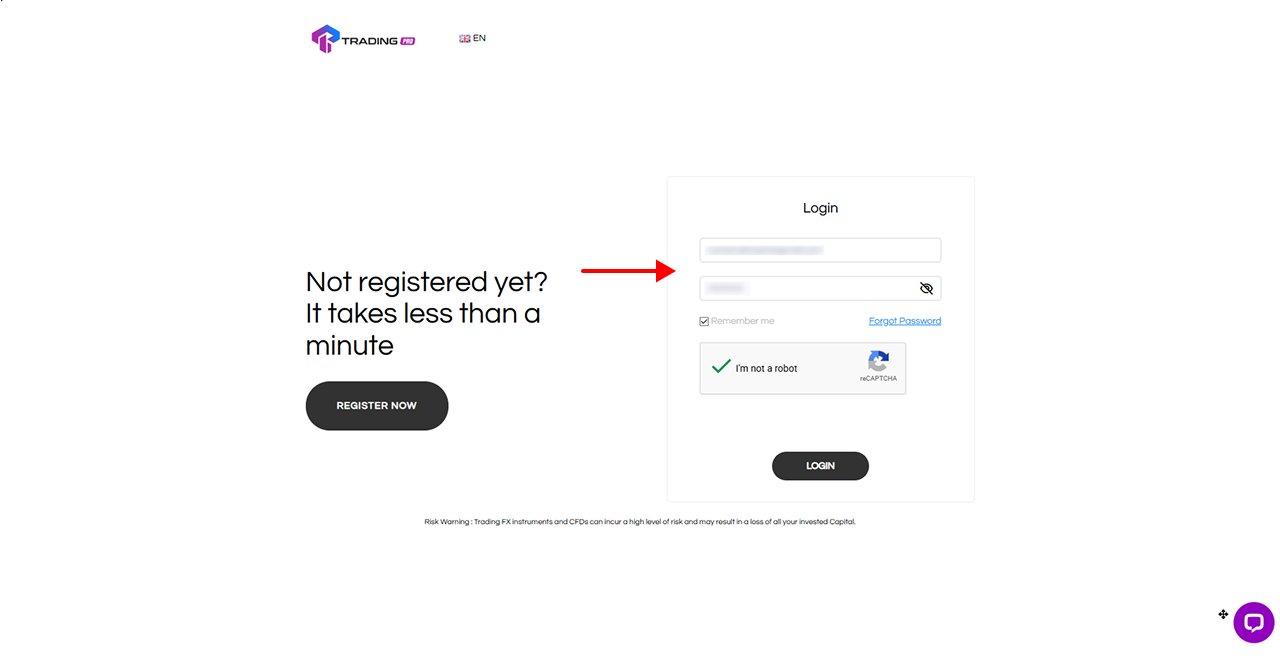
First, open your browser and go to the website. If you already have an account, click the Login button. If you are new, you can register for an account first.

2. Fill Out the Login Form Completely
How to Change Your Phone Number

On the login page, enter your registered email address and password. Don't forget to check the "I'm not a robot" (reCAPTCHA) box for security verification, then click Login.

3. Access the Profile Menu in the Client Portal
How to Change Your Phone Number

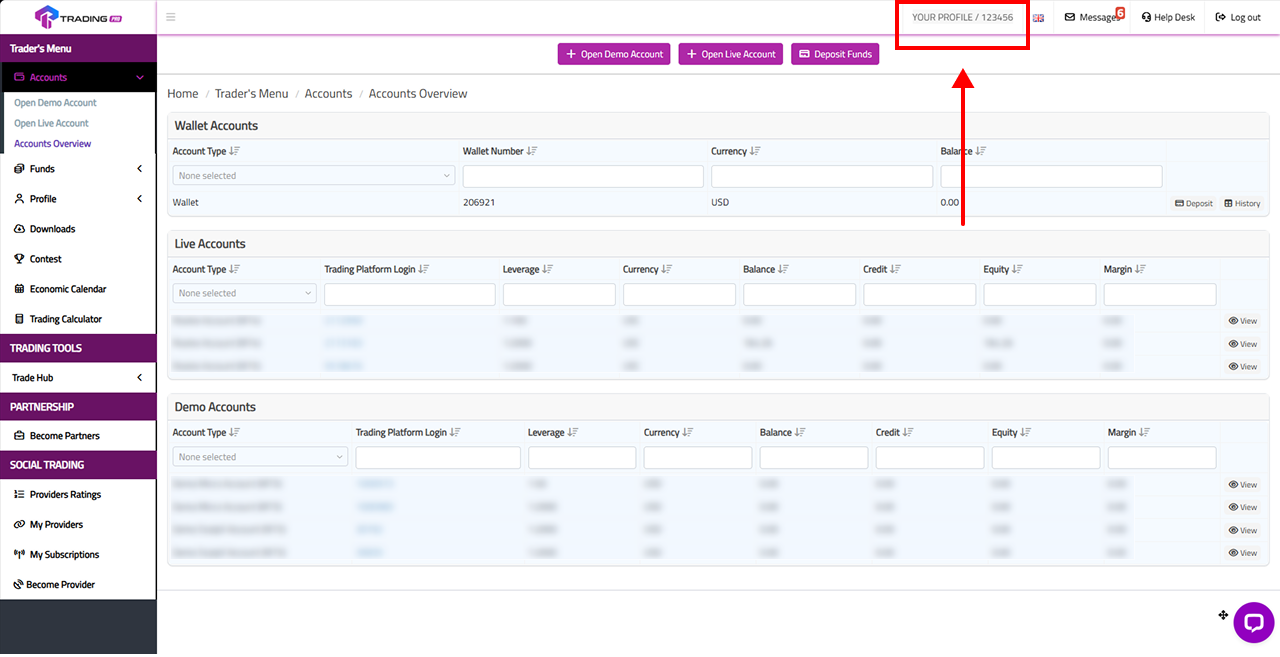
Once you have successfully logged in, you will be directed to the Client Portal dashboard. Look at the top right corner of your screen and click on your Profile Name to access your profile settings.

4. Select the Phone Number Change Option
How to Change Your Phone Number

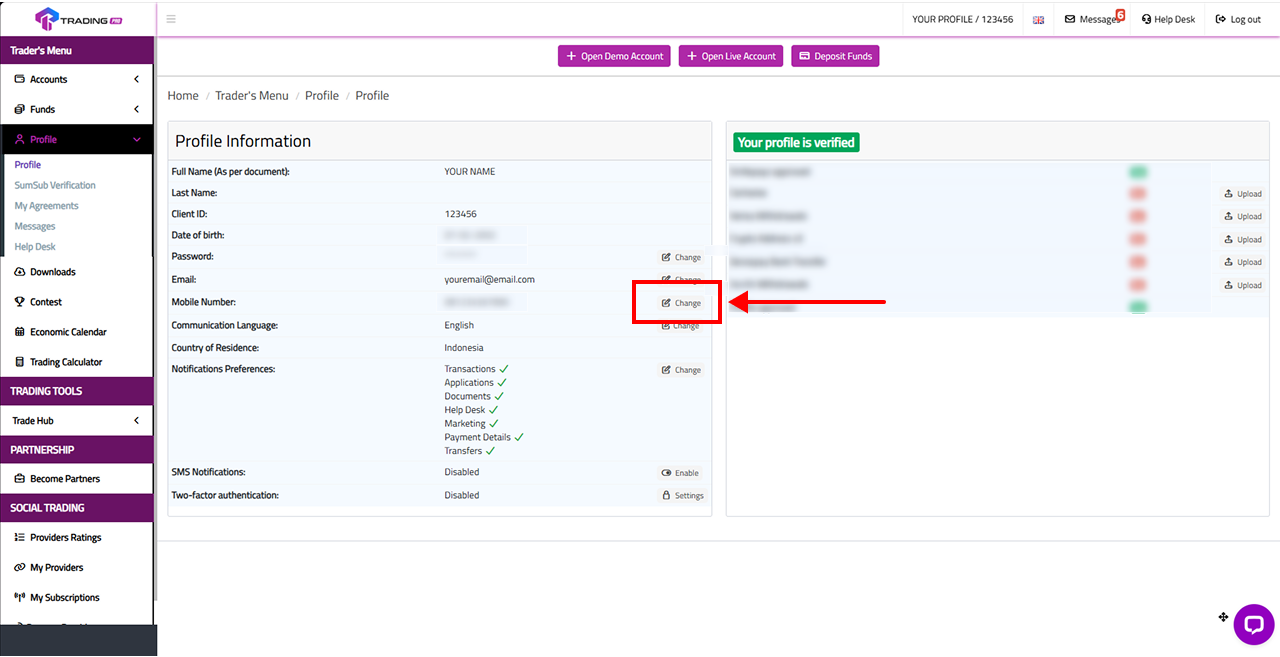
On the Profile Information page, you will see your personal details. Scroll down to find the Phone Number section. Click the Change button or text located to the right of your currently registered phone number.

5. Request a Verification PIN via Email
How to Change Your Phone Number

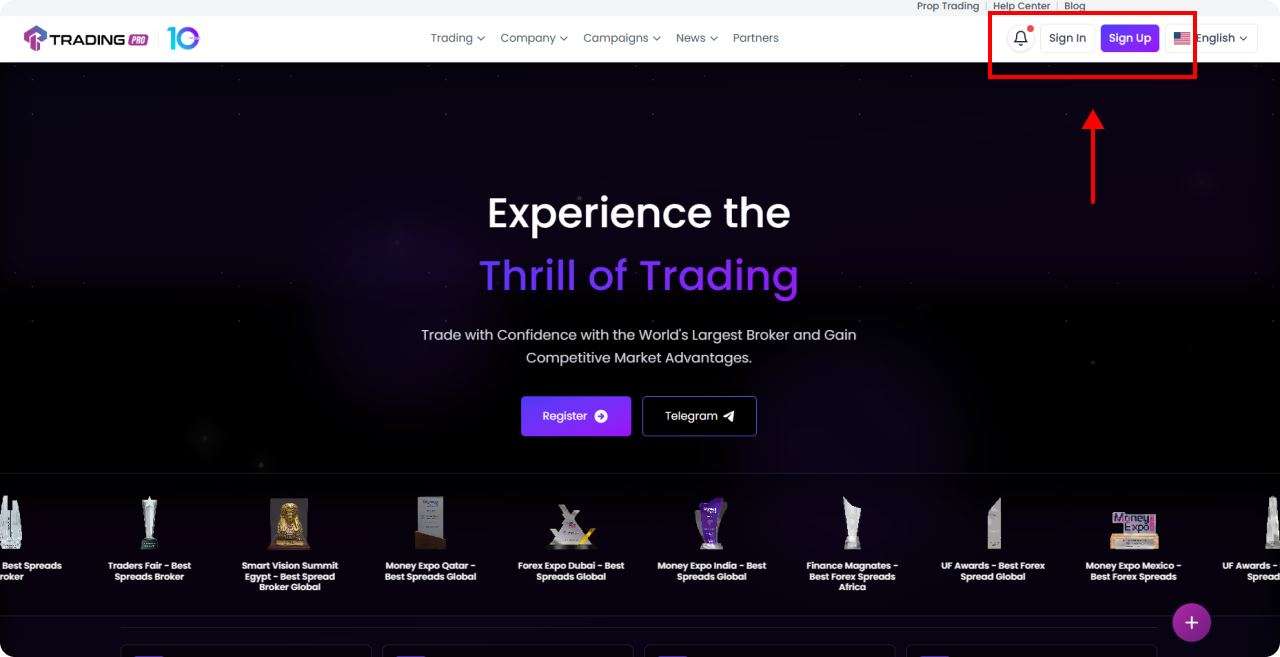
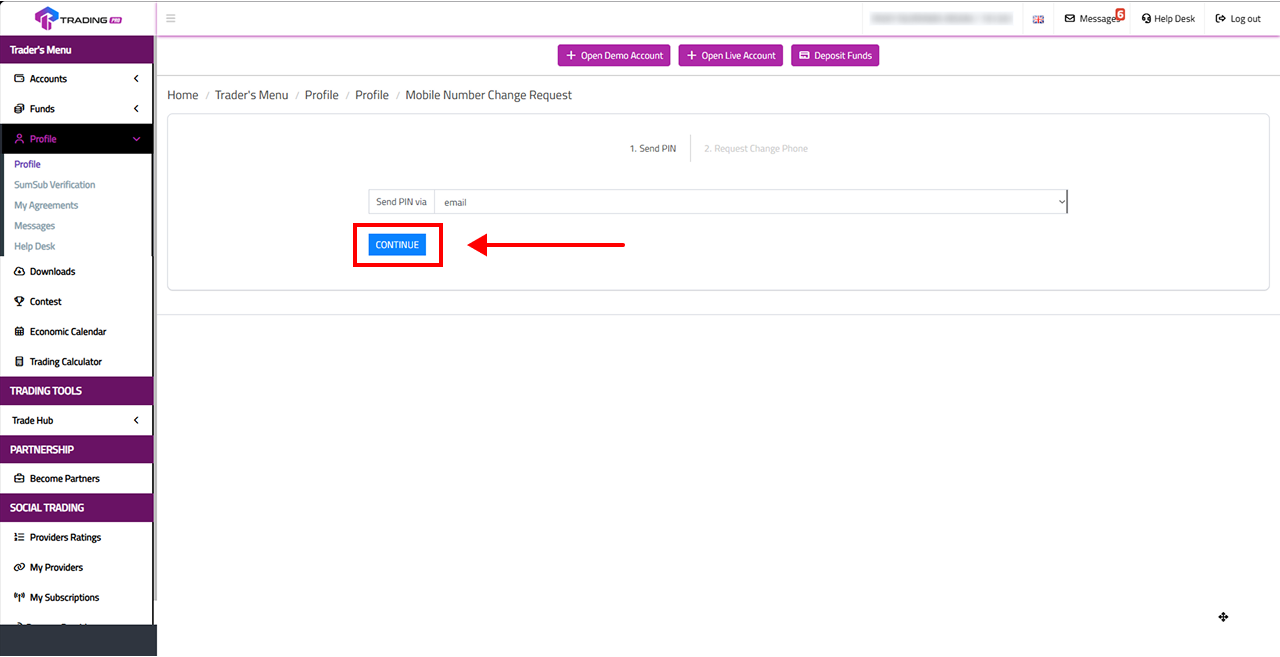
To ensure the security of your account, the system requires verification before any changes can be made. In the Mobile Number Change Request menu, you will be prompted to send a PIN. Choose the delivery option via Email, then click Continue (or Send).

6. Check Your Email and Copy the PIN Code

Open a new tab and go to your email inbox. Look for a message from containing your verification PIN code. Highlight and copy the code.

7. Enter Your New Number and Reason for Change
How to Change Your Phone Number

Go back to the Client Portal. Paste the PIN you just copied into the designated field. Next, enter your New Phone Number and provide a Reason for the change. Submit and save your changes.

You're all set! The phone number on your trading account has now been successfully updated. Make sure your new number remains active so you never miss out on important information or notifications regarding your account.

Engage with a trusted broker today

See for yourself why TradingPRO is the broker of choice for over 800,000 traders and 64,000 partners.

Trading Pro logo

Deposits & withdrawals

Learning

Fraud Prevention


The TradingPRO International (PTY) LTD (Registration number 2014​/202132​/07) is a Financial Services Provider authorised and regulated by the Financial Sector Conduct Authority (FSCA) of South Africa under the licence number FSP No. 49624. The registered address is at Office 106 1st Floor Pharos House 70 Buckingham Terrace Westville Kwa-Zulu Natal 3630

TradingPRO International Limited (Registration number 208079 GBC) is a Global Business Licence under Section 72 of the Financial Services Act 2001 and an Investment Dealer (Full Service Dealer, excluding Underwriting) Licence under Section 29 of the Securities Act 2005 authorised and regulated by Financial Services Commission, Mauritius under license number GB23202513. The registered address is at 3rd Standard Chartered Tower, Cybercity, Ebene 72201, Mauritius.

Information: Clients who are interested in registering must be at least 18 years of age and above to use the TradingPRO service. For traders who want to start trading, one must know and understand the risks involved, if not including possibilities for you to experience losses ahead. One must be cautious when using the currency market. Traders are encouraged to use the margin to assess the level of ones ability.

Risk Warning: Any information or element made for publication purposes, copying, or reproduction shall be obtained only in writing from TradingPRO. Kindly note that forex trading and trading in other leveraged products involve a significant level of risk and are not suitable for all investors. Trading with financial instruments may result in profits as well as losses, and your losses can be greater than your initial invested capital. Before undertaking any such transactions, you should ensure that you fully understand the risks involved and seek independent advice if necessary.

This information is not directed nor intended for distribution to or use by residents of certain countries including, but not limited to, Australia, Belgium, France, Iran, North Korea, and the USA. The Company does not offer its services to residents of certain countries including, but not limited to, Australia, Belgium, France, Iran, North Korea, and the USA. The Company holds the right to alter the above lists of countries at its discretion.


© 2026 TradingPRO. All rights reserved.

Facebook Instagram Threads X TikTok Linkedin Telegram