




- Published on: 2026-11-16 18:02:07
Buy Stop vs Buy Limit: How Each Sets Your Purchase Price
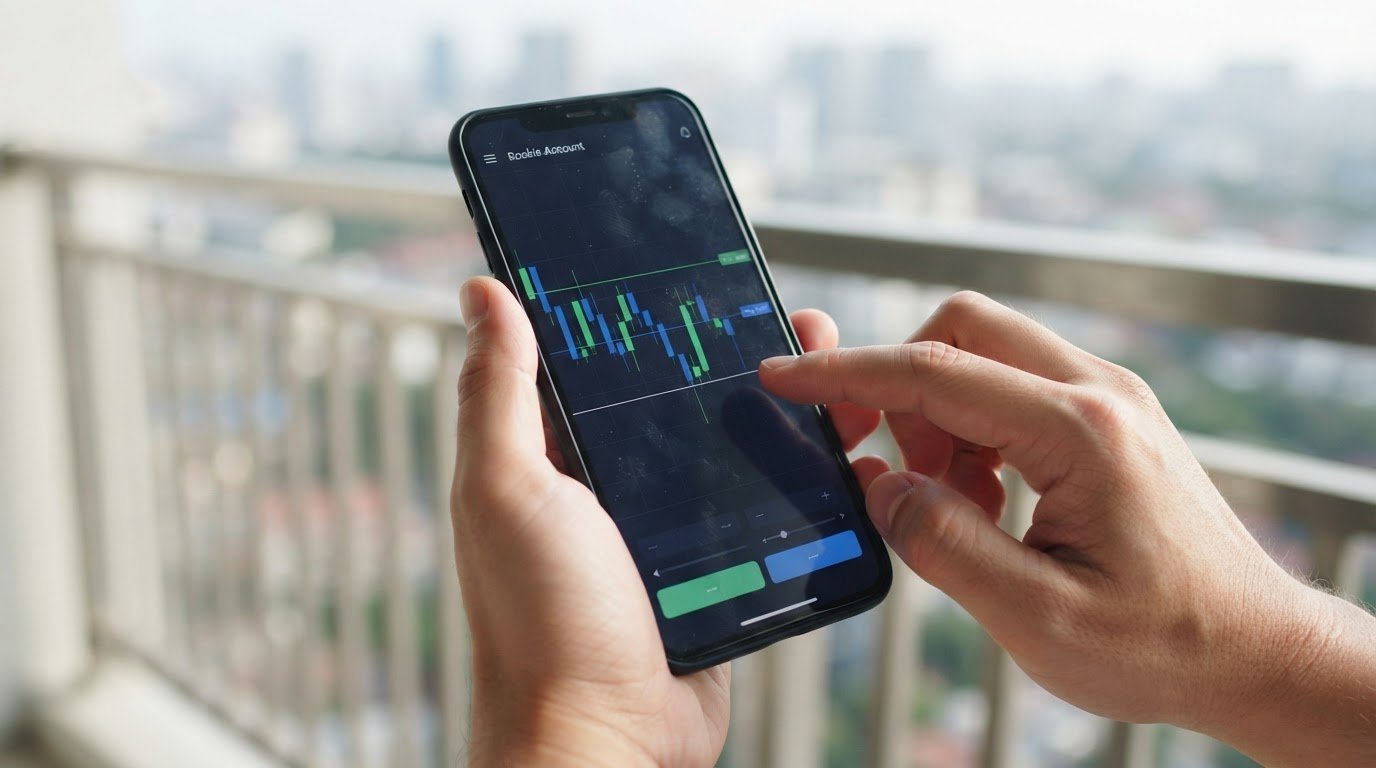
A price ceiling doesn’t always get you into a trade. In this beginner guide to pending orders, the buy stop vs. buy limit choice comes down to what you want to control: a buy limit sets the most you’ll pay, while a buy stop triggers a purchase when the market rises to your chosen stop price.
A buy limit may fill at its limit price or lower, but it can remain unfilled if the market doesn’t reach that level. A buy stop becomes a market order once triggered, so it may execute above the stop price as the market moves. Each order suits a different entry plan, and neither guarantees both price control and execution.
This guide explains how both orders work, how they can affect your purchase price, and how to choose between them. It also covers execution uncertainty, so you can match the order type to your market view and intended trade.
Key Takeaways
- Choose a buy limit when controlling the maximum entry price matters more than entering immediately.
- Use a buy stop when your plan depends on the market reaching a higher trigger level before you enter.
- Consider the trade-off between price control and execution when selecting an order type.
- Factor in market movement: a triggered stop order can fill at a different price from its stop level.
- Match your trading approach to an account option such as Rookie, Micro, Pro, or Scalp.
What is a limit order and how does it work?
A pending order waits for a specified market condition before becoming active. A buy stop triggers above the current market price and then becomes a market order, while a buy limit sets the maximum price you’ll pay.
Execution Certainty and Speed
Execution certainty and speed describe the trade-off between controlling your price and entering promptly. A market order is designed to execute immediately at the available price, but that price isn’t guaranteed.
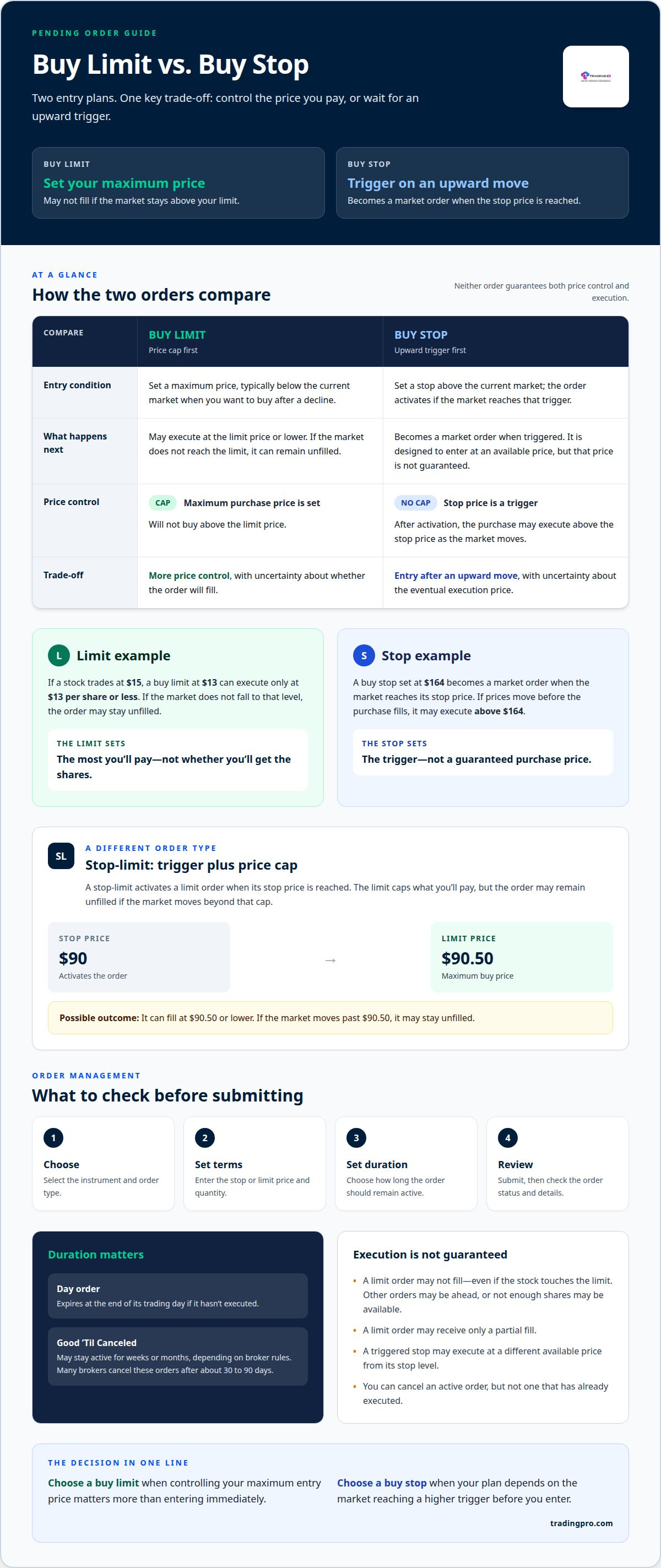
For example, a buy stop set at $164 becomes a market order when the market reaches its stop price. The order may then execute above $164 if prices move before the purchase is filled. The last-traded price may also differ from the price available when your order executes.
A stop-limit order works differently: reaching its stop price activates a limit order, which won’t buy above its specified limit. That caps the purchase price but creates uncertainty about whether it will fill. If the market moves beyond the limit, the order may remain unfilled. These differences matter when choosing between entry speed and price control.
Placing and Managing Pending Orders
Pending orders let you set conditions for when an order should be submitted or executed. To place one, select the instrument and order type, enter the stop or limit price and quantity, choose its duration, then submit it and review its status.
For a buy stop, set the trigger above the current market price. For a buy limit, enter the maximum price you’ll pay. Brokers determine available order settings and fee treatment, so these can vary. Review the order details shown before submitting.
Risks include a stop triggering at a different available price, a limit order not filling, and a stop-limit order remaining unfilled after activation. A day order expires at the end of its trading day if it hasn’t executed. A Good ’Til Canceled order may stay active for weeks or months, depending on broker rules; many brokers cancel these orders after about 30 to 90 days. You can cancel an active order, but an order that has already executed can’t be canceled.
Buy limit orders and maximum purchase prices
A buy limit order sets the highest price you’re willing to pay. If a stock trades at $15, a buy limit at $13 can execute only at $13 per share or less. It won’t buy above the limit, even if the market rises quickly.
Place a buy limit below the current price when you want to buy only after a decline. A buy stop goes above the current price and activates if the market reaches its trigger. The order types reflect different entry strategies: seek a lower price with a limit, or wait for an upward move with a stop.
For example, an investor seeking ABC stock for no more than $10 could enter a buy limit at $10. If the available price falls below $10, the order may execute at that lower price. If ABC stays above $10, the order remains unfilled. The specified limit controls the maximum purchase price, not whether the trade will happen.
That distinction shapes how you enter a position. A limit order can secure a purchase price at or below its cap, but the market must offer shares at that price. Even if the stock touches the limit, the order may not fill: other orders may be ahead, or not enough shares may be available. Price control comes with execution uncertainty.
A stop-limit order combines two price levels. Its stop price activates the order; its limit price then sets the highest price acceptable for a buy. For example, a buy stop-limit with a $90 stop and a $90.50 limit becomes a limit order when the stock reaches $90. It can fill at $90.50 or lower, but not above that cap. If the market moves past $90.50, the order may stay unfilled.
Stop-loss and take-profit instructions manage a position after entry. A stop-loss sell can trigger when the market reaches its stop level, then become a market order, so its execution price may differ. A take-profit sell limit sets the minimum acceptable sale price. These exit instructions don’t change the buy limit’s maximum entry price.
For a clear trading plan, define the entry condition and maximum purchase price before submitting an order. Then decide what should happen if the market moves against the position or reaches your target. You can start building a trading account with those order distinctions in mind.
Buy limit orders
A buy limit order is useful when you’ve chosen the highest purchase price that fits your trading plan. If Company A trades at $10, a limit order for 100 shares at $8 can buy only at $8 per share or lower. The order protects you from paying above its cap, but it won’t secure a position if the market stays higher.
That trade-off is central to this order type. A market order prioritizes buying at an available price; a limit order prioritizes price control. If a stock trades at $100 and your buy limit is $75, the order waits for the market to reach $75 or less. If the price never falls that far, the order remains unfilled, even if your analysis still favors the stock.
Execution depends on more than the quoted price. Imagine a buy limit for 20 shares at $95. When the market reaches $95, the order may fill at that price or lower, but it can also receive only a partial fill if too few shares are available. Other orders at the same price may be ahead in the queue. A price touch, by itself, doesn’t guarantee that your full quantity will be executed.
Sometimes the market moves through your limit quickly. If sellers accept prices below your $95 cap, the order may fill at a better price, depending on the available offers and order flow. The limit sets the maximum you’re willing to pay, not a required execution price. That distinction helps you assess whether a lower entry is worth the risk of missing the trade.
Order duration also shapes your plan. A Good ’Til Canceled buy limit can remain active beyond the trading day, subject to the broker’s rules. A day order, by contrast, expires if it hasn’t executed during that trading day. New information may change your view, making an old limit unsuitable. Review, cancel, or adjust it before it becomes a position.
Before placing a limit, define the price cap, share quantity, and how long the instruction should stay active. Consider what you’ll do if the stock reaches your level but only part of the order fills. Selling decisions come later: a buy limit controls entry, while a separate exit instruction can set conditions for managing the position or taking profit.
Use a buy limit when avoiding a purchase above a chosen price matters more than immediate execution. If your plan depends on entering only after an upward move, a buy stop offers a different trigger and execution trade-off. Choose according to your entry strategy, not the assumption that every order will fill.
Buy stop orders
A buy stop order is placed above the current market price and activates when the market reaches its stop level. It suits an entry plan that depends on upward price movement, rather than a purchase at a lower price. For example, if a stock trades at $25, a trader could set a buy stop at $26.75 for 50 shares. If the price reaches the stop, the order becomes a market order.
That trigger doesn’t set the final purchase price. Once activated, the market order seeks to buy at an available price, so the shares may be filled above the stop level. If the stock rises quickly after reaching $26.75, buyers willing to accept higher prices can move the available price before the order executes. A buy stop therefore helps define when to enter, not the maximum price you’ll pay.
A buy stop can support a breakout strategy. A trader may wait for a stock to rise through a chosen level before opening a position, rather than buying while it trades below that threshold. The order activates only when the market reaches the stop price. If it never reaches that level, the buy order stays inactive and no position opens from it.
Buy stops also have a role in managing short positions. If a trader has sold a stock short, rising prices can work against that position. A buy stop above the current market price can trigger a purchase if the price rises to the chosen level, helping limit the loss or protect a profit. For instance, a buy stop-loss order for a stock trading at $20.50 could use a $22.20 stop. If triggered, it buys at the current market price, which may differ from $22.20.
Consider the trade-off before choosing an order. A buy stop prioritizes activation after an upward move, while a buy limit prioritizes a maximum purchase price. A stop order may execute above its trigger; a limit order may remain unfilled if the market doesn’t reach its limit or enough shares aren’t available. Neither guarantees both entry and a chosen execution price.
For a buy stop, set the trigger above the current market price, then choose the quantity and order duration. Review the trigger and consider how a fast move could affect execution before submitting. If controlling the maximum price matters more than entering after a rise, a stop-limit order adds a limit price after activation. That cap can prevent a higher purchase, but the order may not fill if the market moves beyond it.
Choosing between stop and limit orders
A beginner guide to pending orders starts with the entry condition you want: a price ceiling or a price trigger. The buy stop versus buy limit choice follows from that priority. To buy only at a chosen price or lower, use a buy limit. If your plan starts when the market rises to a specified level, use a buy stop.
Apply that choice to your market view. If a stock trades at $50 and you want to buy after a pullback, a buy limit below $50 sets your maximum. If you want to enter only after the stock rises through a level, place a buy stop above $50. A stock that normally trades between $48 and $52 may be unlikely to reach a $35 buy limit soon, so consider whether that price matches your intended entry.
Next, consider what could happen during a fast move. A buy stop becomes a market order when triggered, so the execution price may be higher than its stop. A buy limit avoids paying above its cap, but it may remain unfilled, even when the market reaches that price. Choose a stop when the trigger matters more than a fixed maximum; choose a limit when the price ceiling matters more than immediate entry.
The same core distinction applies when trading stocks, forex, and futures in the United States: a buy stop uses an upward trigger, while a buy limit sets a maximum entry price. Product details, available order settings, and execution conditions can differ across markets and brokers, so review the specific order ticket before submitting.
Match the order’s duration to your plan, too. A day order stays active only for the trading day it was placed, then expires if unfilled. A Good ’Til Canceled order can remain active longer, subject to broker rules. For either order, consider what you’ll do if the trigger or limit is reached after your market view changes.
Use this quick decision test before placing an order:
- Want to buy below the current price? Set a buy limit at the maximum you’ll accept.
- Want entry after an upward move? Set a buy stop above the current market price.
- Need both a trigger and a price cap? Consider a stop-limit, while accounting for the possibility it won’t fill.
For readers using a beginner’s guide to pending orders to compare buy stops and buy limits, keep the trade-off clear: a stop-limit adds a cap but can miss the trade. For example, if a stock drops from $50 to $45, a stop-limit with a $50 stop and $49 limit may not execute. Define your priority before you act, then put your trading plan into action with a clear entry rule.
TradingPRO
TradingPRO offers Rookie, Micro, Pro, and Scalp accounts for different trading approaches. Once you’ve decided whether your entry plan needs a price limit or an upward trigger, consider which trading style and account environment fit your broader goals. Social Trading and Copy Trading let users replicate the strategies of successful traders.
Use the distinction between buy stops and buy limits to clarify your own entry rules before choosing how to trade. For a conversation about taking your next step, contact TradingPRO.
Make your next order more intentional
Use this beginner guide to pending orders, buy stops, and buy limits as a starting point, not a substitute for a clear trading plan. Before your next trade, write down which market condition would justify entering and what would make you reconsider. That decision gives each order a purpose and helps keep a momentary price move from driving your entire plan.
Make a habit of reviewing your reasoning after placing an order. Did the market behave as expected? Did your entry rule still make sense as conditions changed? A brief record can help you refine your approach over time and make future decisions more deliberately.
If you’d like to discuss your order questions and trading approach, get in touch with TradingPRO. Take your next step with a plan you understand and can stand behind.
Frequently Asked Questions
What are stock order types?
Stock order types are instructions that tell a broker how to handle a trade. A market order prioritizes prompt execution, while a limit order sets an acceptable price. Stop and stop-limit orders add a trigger condition. For example, an investor planning to enter after a breakout might choose a stop-based order, while someone focused on purchase price might choose a limit. The order type shapes the trade’s conditions, not its outcome.
What is a stop order, and how is it used?
A stop order activates when the market reaches a specified stop price, then becomes a market order. Traders can use a sell stop below the current price to exit if a stock falls, or a buy stop above it to enter after a rise. For example, someone who sold a stock short might use a buy stop as an exit instruction if the price climbs. The trigger level doesn’t guarantee the final execution price.
Why does timing matter in trading orders?
Timing matters because prices and available buyers or sellers can change between submitting an order and its execution. For example, a stock’s last-traded price may differ from the price available when a market order reaches the market. A price move around an opening or closing period can also affect which orders are eligible or fillable. Set the order’s duration with your intended holding period in mind, and review active instructions if your plan changes.
What is a buy stop order and how does it work?
A buy stop instructs the broker to buy after the market rises to a chosen trigger. It may suit a trader who wants evidence of upward movement before entering, such as a stock recovering above a level identified in their analysis. Once triggered, it becomes a market order and may fill at a higher price. The stop determines when the order activates, not the maximum amount paid.
What is a buy limit order and how does it work?
A buy limit instructs the broker to purchase only at the stated limit price or lower. Imagine a trader has identified a stock they want, but only if its market price falls within their planned budget. The order can wait until qualifying prices are available. If the market doesn’t reach the limit, the trader won’t acquire shares through that order. A limit can also receive a partial fill if only some of the requested shares are available.
What is the difference between a buy stop and a buy limit?
A buy stop waits for an upward price trigger, while a buy limit sets a purchase-price ceiling. Think of the choice as “enter after a rise” versus “buy only at this price or lower.” For example, a trader watching a potential breakout may prefer a stop, while an investor waiting for a pullback may prefer a limit. The first prioritizes a trigger; the second prioritizes price control.
What happens if the market gaps past a buy stop or buy limit price?
If the market gaps above a buy stop, trading may resume beyond its trigger. Once activated, the resulting market order can fill at the available price, which may exceed the stop. If the market gaps below a buy limit, the order may execute at or below its limit, depending on available shares and other orders. A gap away from the limit can leave it waiting. A stop-limit adds a price cap but may remain unfilled.


